

If you’re searching for “What is Looker?”, you’re likely evaluating business intelligence tools, comparing it to Power BI or Tableau, or trying to understand how it fits into the Google Cloud Solutions.
Looker has become one of the most influential platforms in modern analytics, but it’s also one of the most misunderstood.
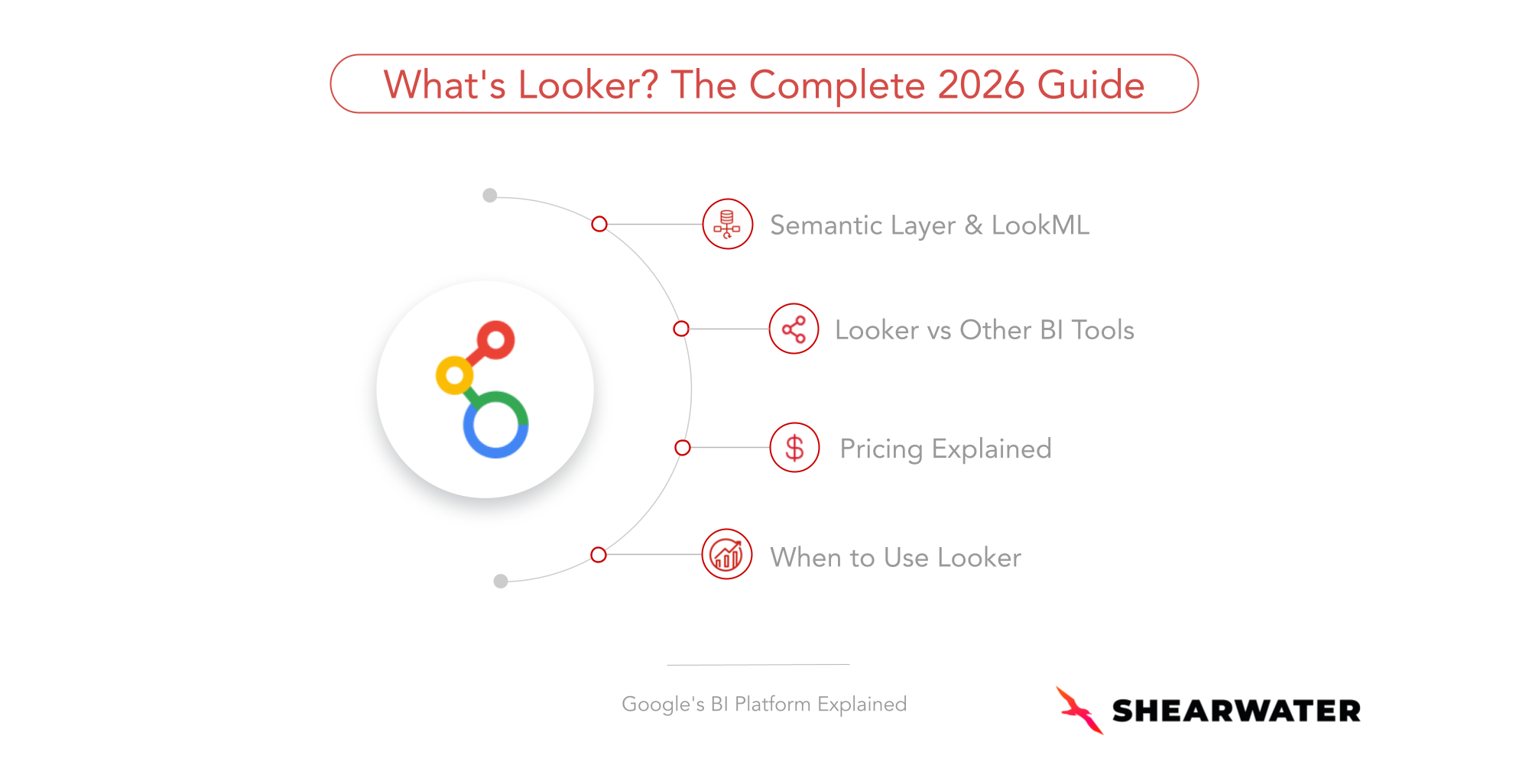
In this guide, we cover:
- What is Looker
- How Looker works (the role of semantic layer & LookML)
- Why Google acquired Looker
- How Looker compares to Power BI, Tableau, Omni, and Sigma
- Typical Looker pricing expectations
- When Looker is the right choice for your organization (and when it isn’t)
Andrew Searson and I (Jeff Garcia), co-founders of Shearwater, were early leaders at Looker and helped shape the platform’s growth in its early years. Over the past 13+ years, we’ve implemented Looker across industries, from startups to global enterprises.
In this way, this guide reflects the perspective of practitioners who work with Looker every day and helped shape the platform itself, going beyond theory and sharing practical insights from real-world implementation experience.
What Is Looker?
Looker is a business intelligence (BI) and analytics platform owned by Google Cloud.
At its core, it adds a semantic layer that governs how data is defined, accessed, and analyzed across an organization.
Unlike most BI tools, Looker doesn't store data. It connects directly to cloud data warehouses such as Google BigQuery, Snowflake, Amazon Redshift, and PostgreSQL, and queries data in real time. This ensures that analytics is always drawing from live, centralized data.
That distinction matters more than it sounds. In traditional BI environments, data gets extracted, copied, and cached.
Over time, different teams end up working from different versions of the truth. Looker was designed to eliminate that problem at the architectural level.
Beyond querying live data, Looker was built to:
- Define business logic centrally, not dashboard by dashboard
- Ensure consistent metric definitions across teams
- Govern data access and permissions at scale
- Enable embedded analytics inside customer-facing products
- Scale analytics infrastructure across large, complex organizations
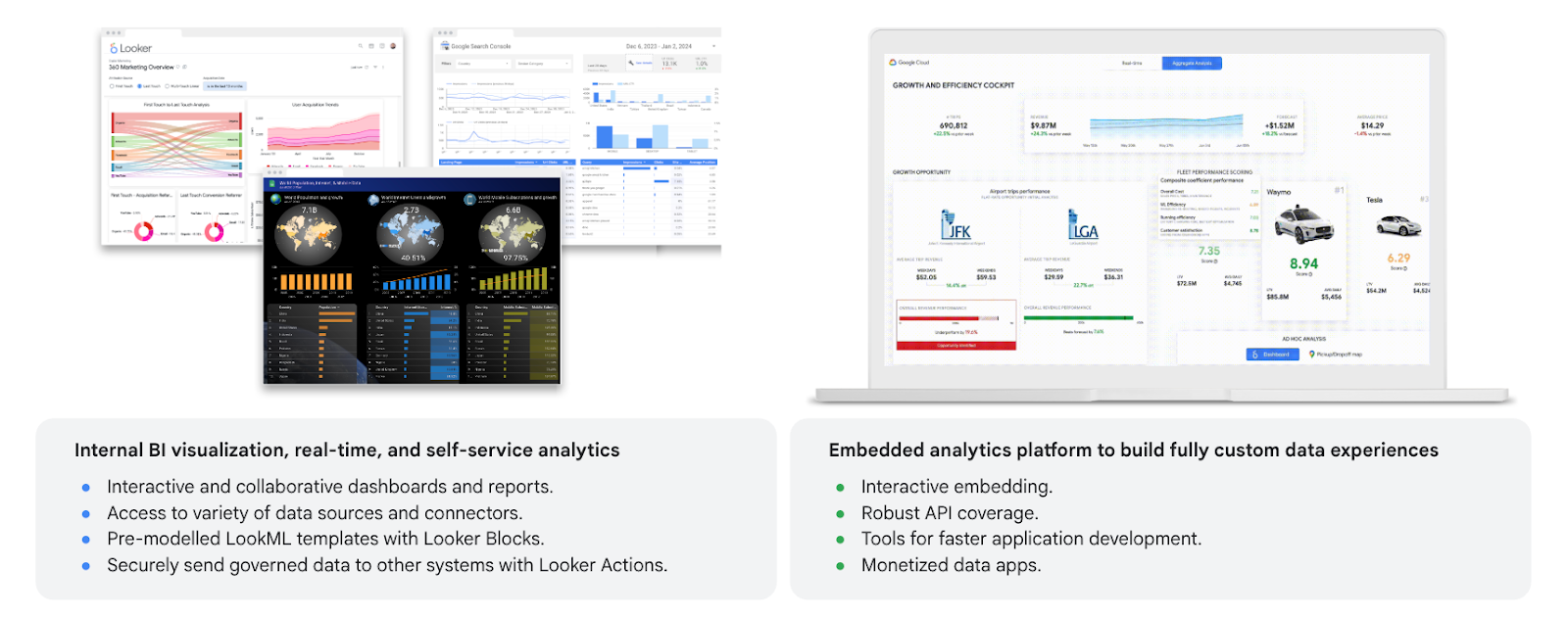
As shown below, it enables teams to build internal BI dashboards while also powering fully embedded analytics inside applications.
The Core Innovation: The Semantic Layer and LookML
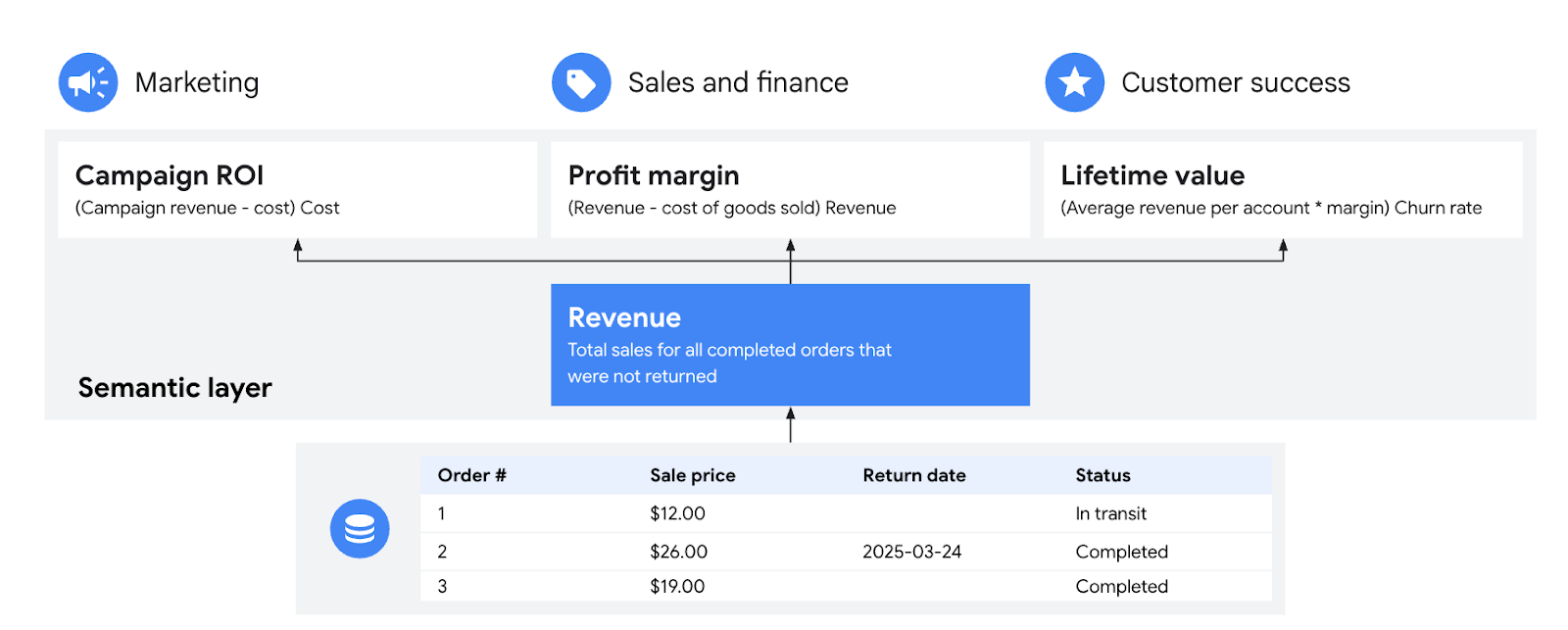
The most important innovation behind Looker is its semantic modeling layer, the layer that sits between the database and the dashboards, defining how data should be interpreted across the organization.
What Is LookML? And How Does Looker Platform Work?
LookML is Looker’s proprietary modeling language. It's how you define data relationships, metrics, dimensions, and business logic (in code, under version control, in a way that every downstream dashboard and report inherits automatically).
With LookML, teams can:
- Abstract complex SQL logic into reusable definitions
- Define metrics and dimensions centrally
- Enforce consistent business logic across every report
- Use Git-based version control for model changes
- Build data models that scale with the organization
Instead of every analyst defining metrics differently, LookML ensures that key metrics, such as Revenue, Monthly Active Users, or Customer Lifetime Value, are defined once and reused everywhere.
This creates a single source of truth for analytics across the entire organization.
When Looker launched, this approach was groundbreaking. Most BI tools at the time focused only on visualization, leaving business logic scattered across dashboards and spreadsheets.
A Quick History of Looker
Looker was founded in 2013 by Lloyd Tabb in Santa Cruz, California.
At the time, the BI market was dominated by legacy platforms like: MicroStrategy, SAP BusinessObjects, IBM Cognos.
These systems were typically:
- On-premise
- Complex to implement
- Expensive to maintain
- Built before the cloud data warehouse era
Looker entered the market with a very different philosophy: build a cloud-native BI platform designed for modern data infrastructure.
Besides the key architectural differences previously mentioned, how Looker interacted with its customers was a core part of its success.
Looker used to establish a Slack channel with every client starting from the POC, and the Support Team acted as an extension of the customer’s Data Team. Our goal during the sales process was to help the person within the organization look good and succeed through a strong implementation.
Looker is not as simple to implement as other BI tools in the market. With this personalized support, we ensured successful implementations and helped customers stick with Looker by enabling them to fully leverage the platform.
The Support Team was called the Department of Customer Love, and they were always just a message away.
As one of Looker’s customers, this is spot on, and I can attest to the real difference it makes. Our analysts knew the extended support team at Looker by name, and they knew our team at goTransverse by name. I remember that after working through a particularly hard problem with our data, Nicole sent our analyst Jennifer an animated graphic of a dancing kitty to celebrate. Looker definitely set the bar high for customer service and support. - Paul Tindall (Software Engineering Leader)
The best part? It was fun to work there. Engineers, Support, and Product teams interacted at the same “kitchen table,” as we referred to it at the time.

Why Tech Companies Adopted Looker Earl
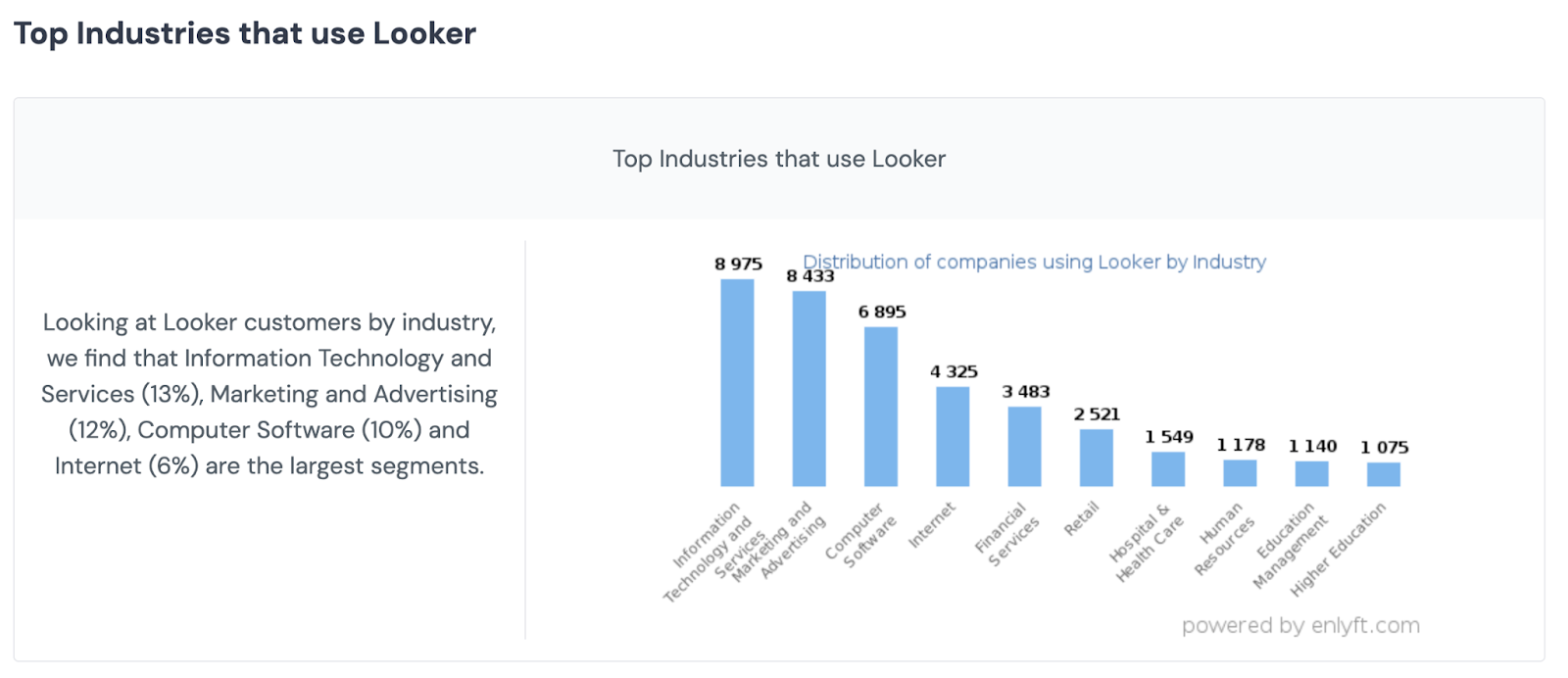
Looker saw rapid adoption among modern data-driven companies, particularly in industries such as:
- SaaS
- Marketplaces
- E-commerce
- AdTech
These companies valued Looker because it supported:
- Git-based workflows
- Developer-friendly modeling
- Strong API integrations
- Robust embedded analytics capabilities
For product-led companies embedding analytics directly into their applications, Looker quickly became a preferred choice, particularly for its ability to deliver rich analytics experiences inside customer-facing products.
I watched this happen from the inside. The companies that adopted Looker earliest weren't doing it because it had the best-looking charts. They were doing it because it let their data teams work like software engineers, versioned models, testable logic, deployable changes, while giving business teams a self-service layer they could actually trust.
Google Acquires Looker (2019)
In 2019, Google acquired Looker for $2.6 billion, one of the ten largest acquisitions in its history.
The move was strategic, since Looker plays a crucial role in driving:
- Cloud data warehouse consumption
- Enterprise stickiness
- Data platform adoption
Microsoft had already built a powerful analytics ecosystem with Power BI and Azure, while Salesforce had strengthened its position through the acquisition of Tableau.
In this context, Google needed an enterprise-grade analytics platform that could anchor its cloud data strategy, drive BigQuery consumption, and compete for enterprise analytics budgets. Looker became a central piece of that strategy.
Over time, the acquisition led to a significant cultural shift within the company. The founders left early, along with much of the original Looker team.
Five years after the acquisition, in 2025, Google decided to unify Looker Support with general GCP Support and outsource the high-touch, personalized service that had previously been a key differentiator.
While this enabled cost optimization and contributed to lower Looker pricing, it has made it more challenging to achieve consistently successful implementations in this new model.
Looker vs Looker Studio: What’s the Difference?
Another move by Google after acquiring Looker was rebranding Google Data Studio as Looker Studio. The idea was to leverage the strength of the Looker brand, but this created - and continues to create - widespread confusion.
Despite the similar name, the two products serve very different purposes and are not integrated.
We explain the key differences between the two tools in detail in our article “Looker vs Looker Studio: Differences, Use Cases, and How to Choose.”
For a quick overview, you can see a brief summary in the image below.
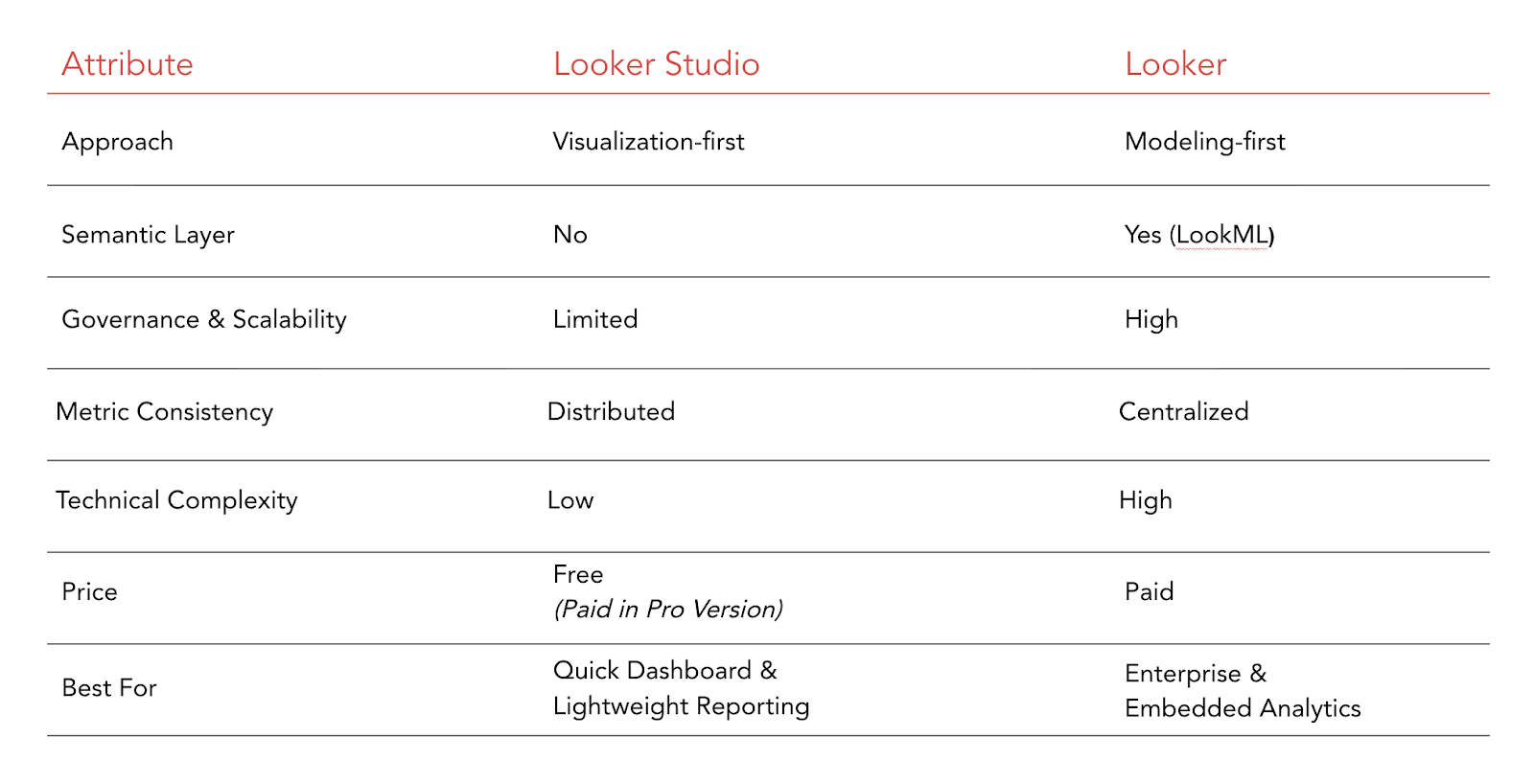
The simplest way to think about it: Looker Studio is a reporting tool. Looker is an analytics platform.
If you need fast, accessible dashboards with minimal setup, Looker Studio is often the right choice. If you need governed, scalable, embeddable analytics infrastructure, that's Looker.
Looker vs Power BI vs Tableau
As mentioned, Looker was Google’s bet to compete with Microsoft (Power BI) and Salesforce (Tableau).
In this context, Looker is often compared to two of the most widely adopted business intelligence platforms.
The table below provides a clear comparison of these three tools.
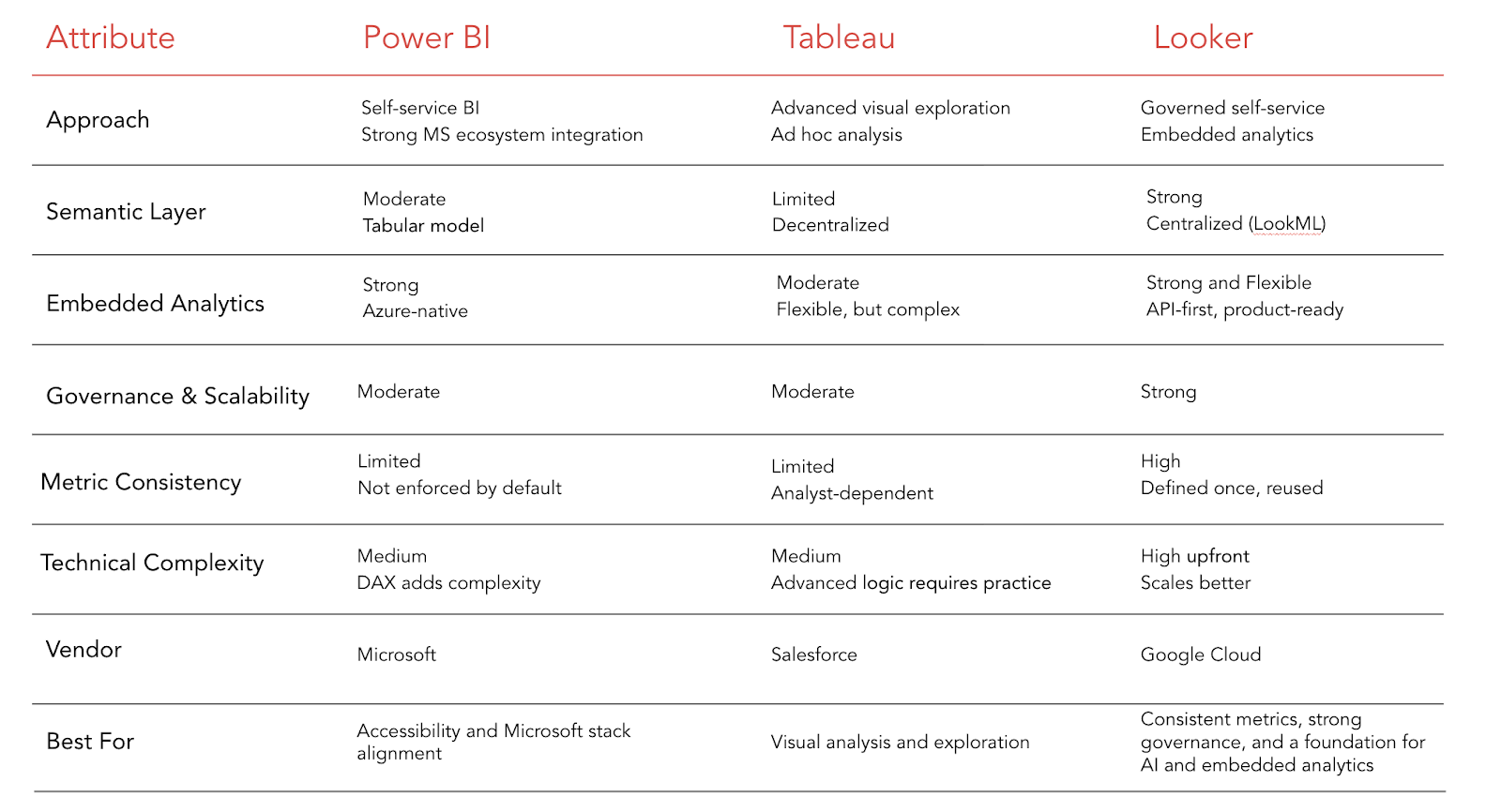
My honest take on each:
- Power BI is the right default choice if your organization lives in the Microsoft ecosystem and your primary need is accessible dashboard creation.
It's fast to get started, the licensing is often already included in enterprise agreements, but keep in mind self-service capabilities are very limited for non-technical users.
- Tableau remains a strong tool for visual analytics and ad hoc data exploration, but we don't think the price justifies.
If your analysts spend their days doing open-ended investigation (slicing data, building complex visualizations, discovering patterns), Tableau's interface is compelling. However, the governance is much weaker and it's also very limited in self-service capabilities.
- Looker is a good choice when consistency and governance matters.
When you have multiple teams that need to report on the same metrics and you can't afford those metrics to diverge. When you're embedding analytics into a product and your customers will see the numbers. When you need your data organization to scale without creating a parallel infrastructure of spreadsheets and one-off SQL queries.
In general, Power BI and Tableau are often easier to demonstrate visually, as they focus heavily on dashboard creation and visual exploration.
Looker, however, typically requires a more architectural conversation, since much of its value comes from its data modeling layer and governance capabilities rather than purely visual design.
Looker vs Modern Alternatives (Omni & Sigma)
A newer generation of analytics platforms has emerged in recent years. Two frequently compared alternatives to Looker are Sigma Computing and Omni Analytics.
Omni Analytics
Colin Zima, Jamie Davidson, and Chris Daniel are the founders and they met in college (Engineering at Princeton). I worked closely with Colin and Jamie for over 7 years at Looker, where they were Product Leaders
In 2022, they reunited to build Omni: an analytics platform where every user can get answers fast, trust the data, and take action.
It was inspired by Looker’s architecture and semantic modeling approach, but with a modern user experience (UX) and interface that enables faster onboarding for teams and analysts
Compared to Looker, key differences include a more flexible approach to modeling, a high-touch support experience (similar to what Looker offered in its early years), and a strong focus on incorporating AI into analytics workflows.
Omni has seen rapid growth in recent years, with reported expansion across the US, EMEA, and APAC, including significant year-over-year growth. Its product roadmap has also evolved quickly.
For organizations evaluating modern alternatives to Looker - particularly those prioritizing faster onboarding, flexibility, and emerging AI capabilities- Omni is often included in the consideration set.
Sigma Computing
Founded in 2014 by former Salesforce and Work.com engineers Rob Woollen and Jason Frantz, Sigma went through several iterations in its early years. For the first seven years, the team built multiple prototypes - many of which failed - as they searched for product-market fit. At one point, the company had shrunk to just three people.
The turning point came when the team rebuilt the product in just 30 days to integrate directly with Snowflake’s cloud data warehouse. This shift to a “live query” architecture - similar to Looker’s approach - became its core differentiator.
Sigma’s spreadsheet-style interface, familiar to Excel users, has driven strong adoption among finance and business teams. It enables fast exploration and lowers the barrier to entry for non-technical users.
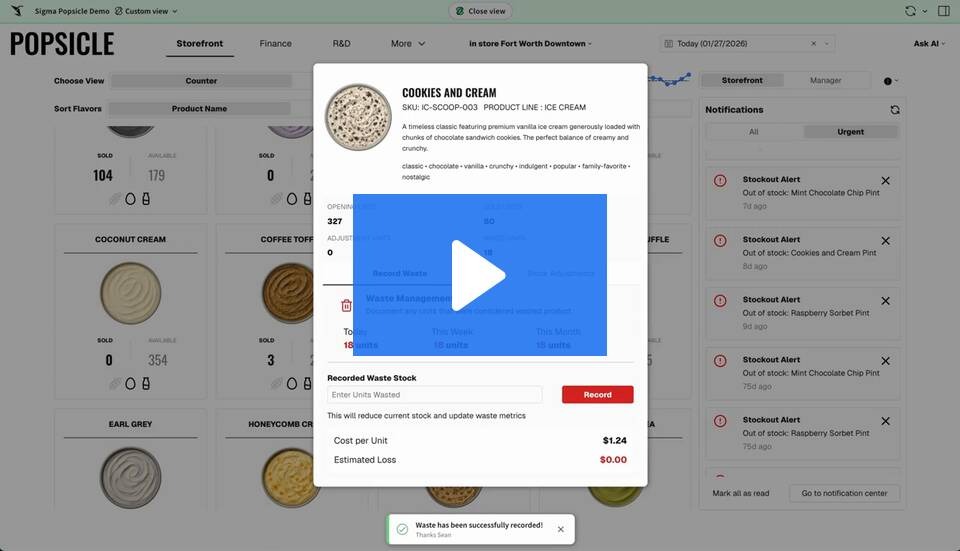
However, this flexibility often comes with trade-offs. Compared to Looker, Sigma typically offers less centralized governance and weaker control over metric definitions at scale - particularly in more complex data environments.
Sigma positions itself as a platform for unified AI applications and analytics, with growing capabilities in this area.
Pricing can be higher depending on scale and usage, and organizations should evaluate it carefully in the context of long-term data governance and architectural needs.
Looker Pricing in 2026
Looker pricing varies depending on several factors, including:
- Number of users: per-seat costs for internal BI users
- Viewer vs. developer user split: different licensing tiers for different user types; the ratio matters significantly
- Embedded analytics usage: embedding Looker into a customer-facing product is priced differently from internal use
- Deployment scale: enterprise contracts scale with data volume and query usage
- Support tier: standard vs. premium support
- Enterprise agreements: special conditions (when applicable)
Historically, Looker contracts often started at around $40,000 per year, which limited adoption in smaller markets such as LATAM and parts of APAC. Today, typical contracts start at $18,000 and $100,000+ annually, depending on the factors mentioned above.
In this way, a smaller internal deployment with a modest number of developer and viewer seats will be toward the lower end. A large enterprise contract with embedded analytics, high query volume, and premium support will be toward the higher end, or beyond it.
One thing worth knowing from my experience is that the licensing cost is often not the largest cost in a Looker deployment. Implementation, model development, and ongoing governance work are frequently larger investments than the contract itself. Any organization budgeting for Looker should account for both.
For a detailed breakdown of pricing structure, licensing models, and total cost considerations, see our guide on Looker pricing.
Why Some Companies Struggle with Looker
Looker is an extremely powerful analytics platform, but it can also be complex to implement and manage effectively.
Following Google’s acquisition of Looker, the high-touch support model that originally differentiated the platform was reduced, leaving many organizations responsible for managing their own implementations and long-term governance.
Without strong internal data teams, experienced implementation partners, and a clear analytics governance strategy, organizations may struggle to fully adopt and scale the platform across their teams.
Since Looker relies heavily on well-structured semantic modeling and disciplined data architecture, poor implementation can quickly lead to issues such as inconsistent metrics, overly complex LookML models, and reduced trust in analytics outputs.
As a result, Looker delivers the most value when it is supported by strong modeling practices, clear governance frameworks, and proper user enablement.
This is why many organizations turn to specialized partners. As highlighted in Shearwater’s article “5 Signs It’s Time to Invest in Looker Consulting Services,” companies often need expert support when their LookML models become difficult to maintain, their data architecture lacks structure, or their analytics environment fails to scale effectively across teams.
Working with experienced Looker consultants can help organizations establish a solid data architecture, streamline their semantic models, and ensure long-term adoption of the platform.
When Should You Choose Looker?
When Looker Is the Right Choice
Looker is likely the right choice if your organization:
- Requires strict, centralized data governance across multiple teams
- Needs consistent metric definitions that can't vary by department or report
- Is building or planning to embed analytics into a customer-facing product
- Operates on a cloud data warehouse (BigQuery, Snowflake, Redshift, or similar)
- Has a data team comfortable with code-based modeling workflows, or is willing to invest in developing that capability
- Operates at enterprise-scale analytics infrastructure or growing toward it
When Looker May Not Be the Best Fit
Looker may not be the best option if:
- Budget is constrained for your organization
- Your primary need is fast, lightweight dashboard creation with minimal setup
- Your team lacks data modeling expertise
Is Looker Still Relevant in 2026?
Yes. Looker remains highly relevant in 2026, especially in a landscape where artificial intelligence is reshaping how organizations consume and generate insights.
More than a traditional BI tool, Looker has evolved into a strategic foundation for AI-powered analytics.
At the center of this evolution is its semantic layer, which provides the context that machine learning models, LLMs, and generative AI workflows need to ensure quality and consistency in their outputs.
They need to know what "revenue" means in your organization. What counts as an active user. How churn is calculated. Without that context, AI-generated insights are unreliable.
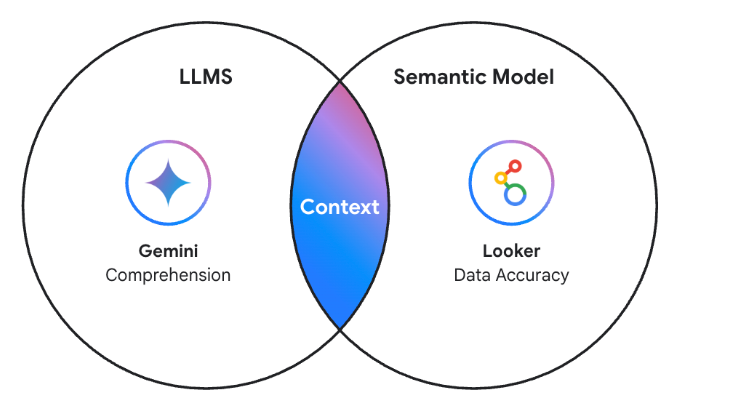
In addition, the integrated governance layer ensures that LLMs and AI agents access only the data they should, maintaining compliance and trust with existing controls.
Beyond the semantic foundation, Looker also incorporates AI-native features that bring these capabilities directly to business users: natural language queries allow anyone to interact with data without technical intermediaries, while proactive insight generation surfaces anomalies and trends before they are explicitly requested.
By combining a governed semantic layer with native AI capabilities, Looker continues to redefine the future of self-service analytics.
FAQ (Frequently Asked Questions)
1. What does Looker mean?
Looker refers to Google Cloud’s business intelligence (BI) and analytics platform.
The name “Looker” comes from the idea of allowing users to “look” into their data and explore insights through dashboards, reports, and data exploration tools.
Today, Looker is widely used by organizations that want to build governed analytics environments powered by modern cloud data warehouses.
2. What is Looker used for?
Organizations use Looker to track business metrics, build interactive reports, explore data across teams, embed analytics into customer-facing products, and enforce consistent metric definitions at scale. Because it queries directly in the data warehouse, it handles large datasets without duplicating or moving data.
3. Is Google Looker free?
No. Looker is paid. Pricing depends on the number of users, deployment scale, embedded analytics requirements, and enterprise support agreements. Typical contracts range from around $18,000 to $100,000 or more per year.
4. Is Looker the same as Looker Studio?
No. Looker and Looker Studio are different products, even though they are both part of the Google Cloud analytics ecosystem. Looker Studio (formerly Google Data Studio) is a free data visualization tool suited for quick dashboards and lightweight reporting. Looker is a BI platform with a centralized semantic modeling layer, strong governance capabilities, and embedded analytics support.
5. Is Looker similar to Power BI?
Both Looker and Power BI allow organizations to build dashboards and reports, explore and analyze data, and share insights across teams.
However, they are built on fundamentally different architectural approaches. Looker focuses on semantic modeling and centralized metric governance, while Power BI emphasizes ease of dashboard creation and tight integration with the Microsoft ecosystem.
As a result, Looker is often preferred by organizations that need scalable analytics infrastructure and strong data governance, while Power BI is popular among teams looking for faster dashboard development.
6. Why is Looker considered a powerful analytics platform?
Because it solves a problem that most BI tools ignore: the consistency and governance of metric definitions at scale. By centralizing business logic in a version-controlled semantic layer, Looker ensures that every team, every dashboard, and every embedded analytics experience draws from the same definitions. That eliminates the "which number is right?" problem that plagues most analytics environments.
-
Is Looker Right for Your Organization?
It depends on what you're trying to build, and how your data team is structured.
If:
- You're evaluating Looker and want an honest comparison based on your specific setup
- You have an existing Looker deployment that isn't delivering the value you expected
- You're planning to embed analytics into a product and need guidance on the architecture
- Your LookML models have grown difficult to maintain and you're not sure where to start
👉 Book a 30-minute call with our team
We'll review your current data stack, understand your goals, and give you an honest recommendation. If Looker isn't the right fit for your situation, we'll tell you that too.
At Shearwater, we specialize in Looker consulting, semantic layer design, and scalable analytics architecture. With more than a decade of experience working with Looker across industries, our team helps organizations build well-governed data models, improve performance, and accelerate analytics adoption.