

Looker vs Looker Studio is one of the most common, and most misunderstood comparisons in the Business Intelligence field.
Although their names are similar and both are Google products, Looker and Looker Studio were built for entirely different purposes, architectures, and levels of analytical maturity.
Understanding this distinction is essential to avoid misguided decisions that, over time, can undermine trust in your data and limit your company’s analytical growth.
To bring clarity to this comparison, we include in this article the perspective of Andrew Searson, one of the most experienced professionals in the Looker ecosystem.
With nearly two decades in data analytics, Andrew was one of Looker’s early employees, helping scale the platform before its acquisition by Google. He later led Looker Sales Analytics at Google Cloud and recently founded Shearwater Data, a U.S.-based consultancy focused on self-service analytics.
In this article about Looker vs Looker Studio, you’ll understand:
- What Looker is
- What Looker Studio is
- The key differences between them
- When to use each tool
- Which one is more strategic for your company
If you’re looking to evolve your data strategy and are considering Looker as your BI platform, this article could be a decisive factor in the success of your initiative.
Looker vs Looker Studio: Are They the Same BI Platform?
Despite their similar names, Looker and Looker Studio serve fundamentally different analytical needs. While some overlap exists, they are often most effective when used together. Let’s take a closer look at each one.
What is Looker?
Looker is a cloud-based Business Intelligence platform accessible through the browser.
Its core differentiator is its modeling-first approach, powered by LookML (Looker Modeling Language), which enables the creation of a centralized semantic layer that standardizes how data definitions and data relationships and consumed across the organization.
Through this semantic layer:
- Analysts and engineers define business logic (e.g., Total Revenue, LTV, Active Users)
- Metrics are version-controlled and governed
- Business users consume standardized KPIs
- The organization establishes a single, reliable source of truth.
In practice, complex joins, metrics, and business logic are defined once and reused across the company, ensuring scalability and trust.
Beyond traditional BI capabilities, Looker functions as a true data platform that enables data products by combining a centralized semantic layer with:
- In-database execution directly on the data warehouse
- An API-first architecture
- Granular access control at the row and column level
This foundation allows organizations to industrialize their metrics and business logic, ensuring consistency across dashboards and embedded analytics experiences.
Looker also provides others advanced capabilities such as:
- Deep analysis with drill-down and drill-through capabilities
- Real-time alerts and automation
- Integration with machine learning models
Because business definitions live in a governed, reusable semantic layer, Looker provides the structural consistency required to support AI-driven use cases, including Conversational Analytics, in a secure, reliable, and scalable way.
Looker is a paid (see more info about Looker’s pricing here), enterprise-grade solution designed for organizations that treat data as a strategic asset and require scalable, complex data analytics.
While it is extremely powerful for governed self-service analytics, Looker requires technical expertise and advanced data modeling. As a result, implementation and major changes typically demand specialized support or a highly technical internal team.
What is Looker Studio?
Looker Studio (formerly Google Data Studio) is a visualization-first BI tool designed for fast and accessible reporting.
Its primary goal is to enable fast, intuitive dashboard creation through a drag-and-drop interface with minimal technical complexity.
Unlike Looker, Looker Studio:
- Does not have a centralized semantic layer
- Does not use a proprietary modeling language
- Defines calculations directly within charts
This makes it highly accessible and easy to use, but is inconsistent and lacks scalability for complex organizational needs. Looker Studio is less suitable when you require strict cross-team metric standardization, version-controlled definitions, advanced governance, or complex access management.
Looker Studio offers a free version as well as Looker Studio Pro, which adds collaboration and administrative features, making it suitable for larger teams that require additional control. However, even with these enhancements, it does not replace a full enterprise-grade BI platform.
Typical users include marketing and growth teams that need to visualize data from tools like Google Analytics without relying heavily on the data team, as well as small companies with limited financial resources.
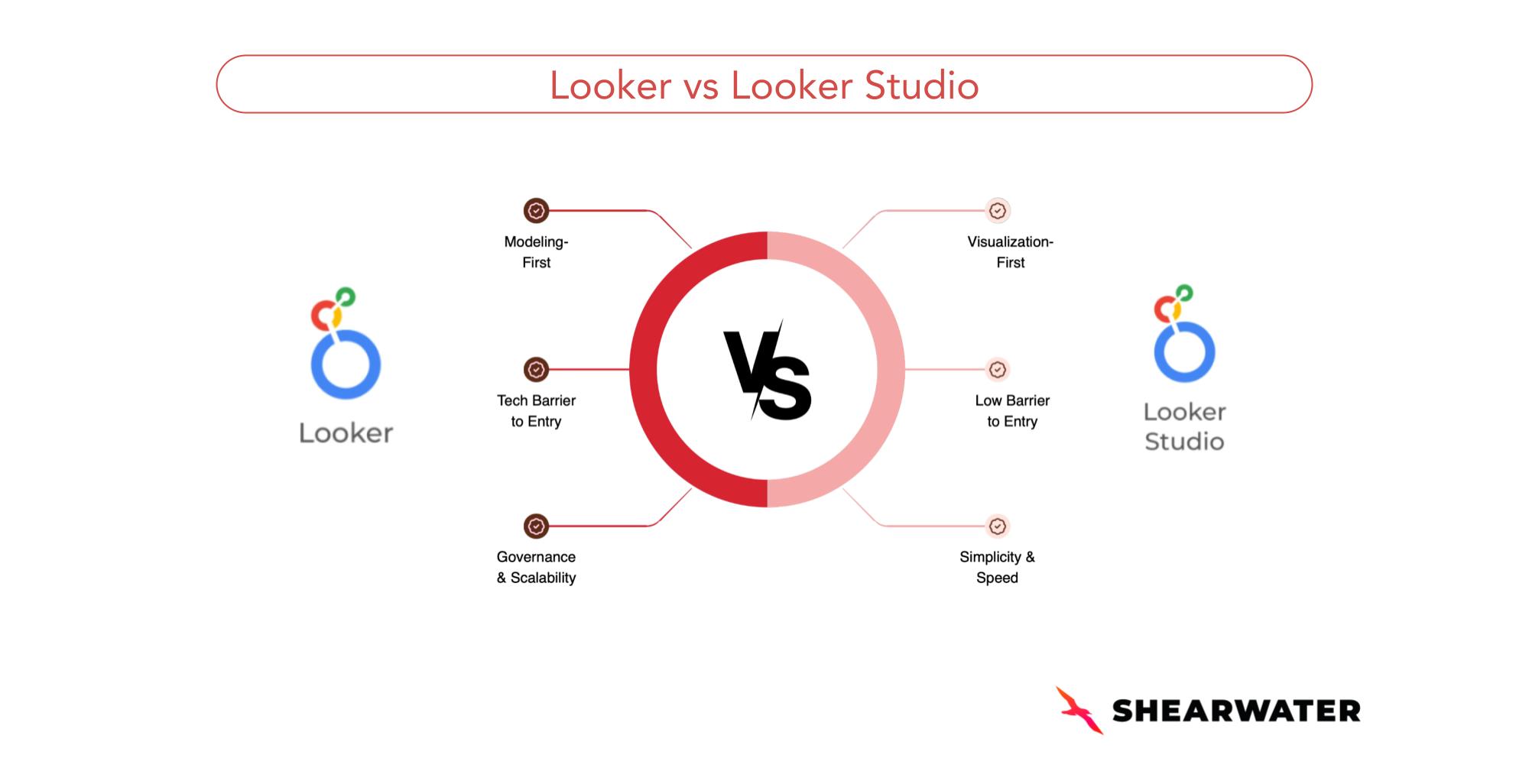
Key Differences Between Looker and Looker Studio
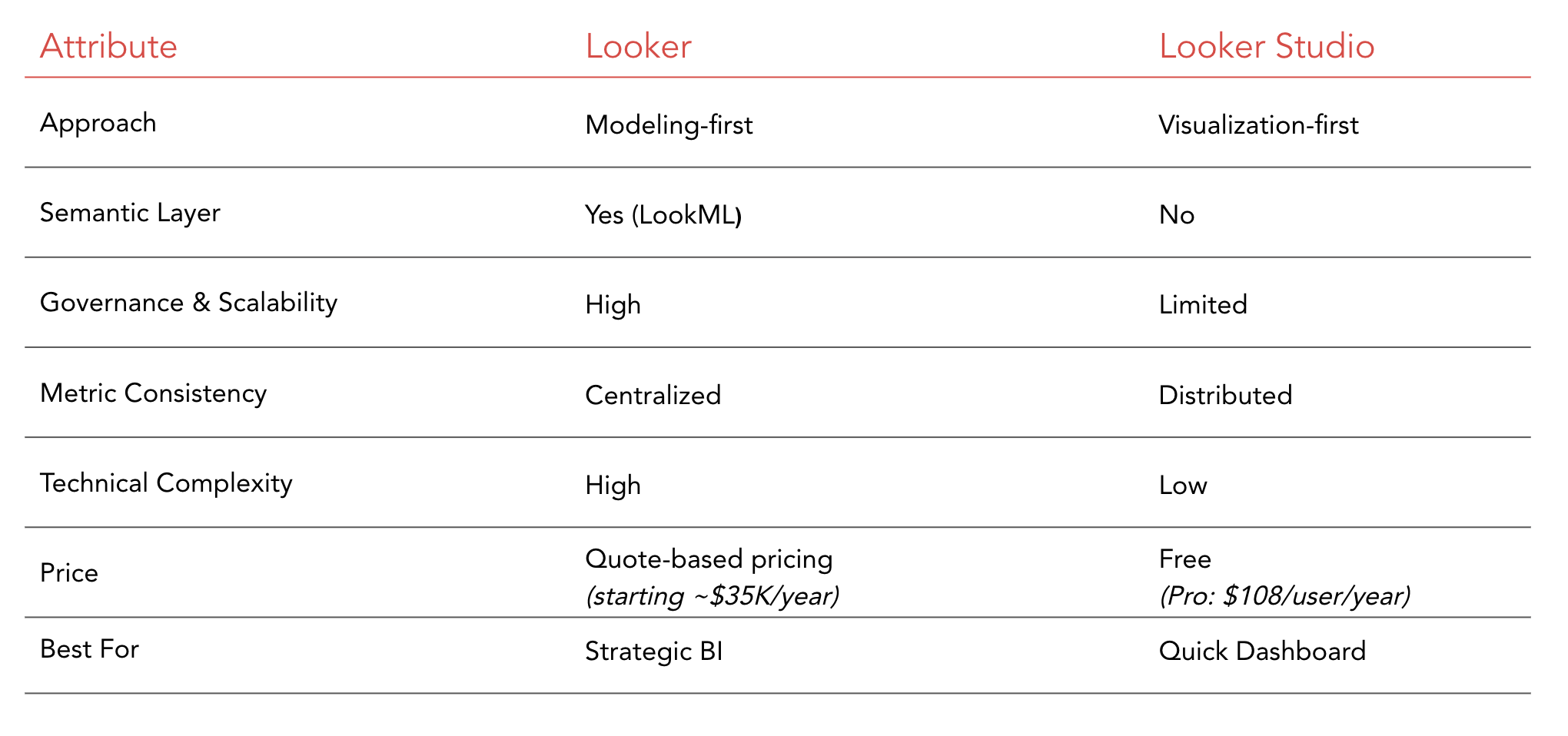
In the table below, we visually compare the key attributes that differentiate the two tools.
Looker vs Looker Studio: Which One Should You Choose?
The short answer to this question is: it depends!
What do you intend to use the tool for?
What problem are you trying to solve?
Are standardized metrics across teams critical?
These are the first questions you should ask yourself before choosing one tool over the other.
The decision typically comes down to two strategic approaches:
- Governance, consistency, and scale
- Speed, simplicity, and accessibility
Choose Looker if:
- Metrics must be consistent and reusable
- You want to build a single source of truth
- Multiple teams depend on shared KPI definitions
- Business logic is complex and requires governance at scale
- You have a structured data warehouse
- You can invest in a specialized structure
- You want to enable data products, embedded analytics, and conversational analytics
Choose Looker Studio (or Looker Studio Pro) if:
- You need fast, simple dashboards
- Governance is not a priority
- You primarily use Google ecosystem data sources (e.g., Google Analytics, Google Sheets, BigQuery)
- Easy sharing and embedding are important
- You’re looking for a low-cost or free solution
- You need a low barrier to entry (non-technical)
Can You Use Looker Studio and Looker Together?
In many cases, the best approach in the Looker Studio vs Looker decision is not choosing one over the other, but using both strategically.
- Not every dashboard requires strict governance.
- And not every analysis can depend on business logic that differs across multiple teams.
Many organizations use:
- Looker for strategic analyses that require precision and strong governance
- Looker Studio for building simpler, faster operational reports
When positioned correctly, both tools can coexist within the same data strategy.
FAQ (Frequently Asked Questions)
1. Are Looker and Looker Studio the same tool?
No. Looker is an enterprise platform with governance and a centralized semantic layer. Looker Studio is a simpler data visualization tool focused on building quick dashboards.
2. What is the main difference between Looker and Looker Studio (formerly Google Data Studio)?
Looker centralizes and standardizes metrics, enabling governed data exploration with consistency and scalability. Looker Studio is more focused on ad-hoc analysis, prioritizing agility and simplicity.
3. When should you choose Looker? When should you choose Looker Studio?
Choose Looker when you need standardized metrics across teams; governance and access control; complex business logic, or scalable analytics.
Choose Looker Studio when you need quick dashboards; consistent and reusable metrics across teams don’t matter, low technical complexity, and lower-cost solution
4. For Conversational Analytics and AI use cases, which is more suitable?
Looker. Because business logic is centralized in a governed semantic layer, Looker provides the structural foundation needed to support AI and conversational analytics in a secure, consistent, and scalable way.
-
Need Help Choosing BI Tools?
If you’re evaluating Looker or building a governed analytics strategy, we can help you make the right long-term decision.
We’ve supported companies from startups to enterprises in building modern analytics stacks around tools that truly scale, and your organization could be next.