

Many companies pay for Looker licenses that barely get used. A few analysts are in dashboards every day, while most of the company opens one report at month-end, and every one of those users is an added cost.
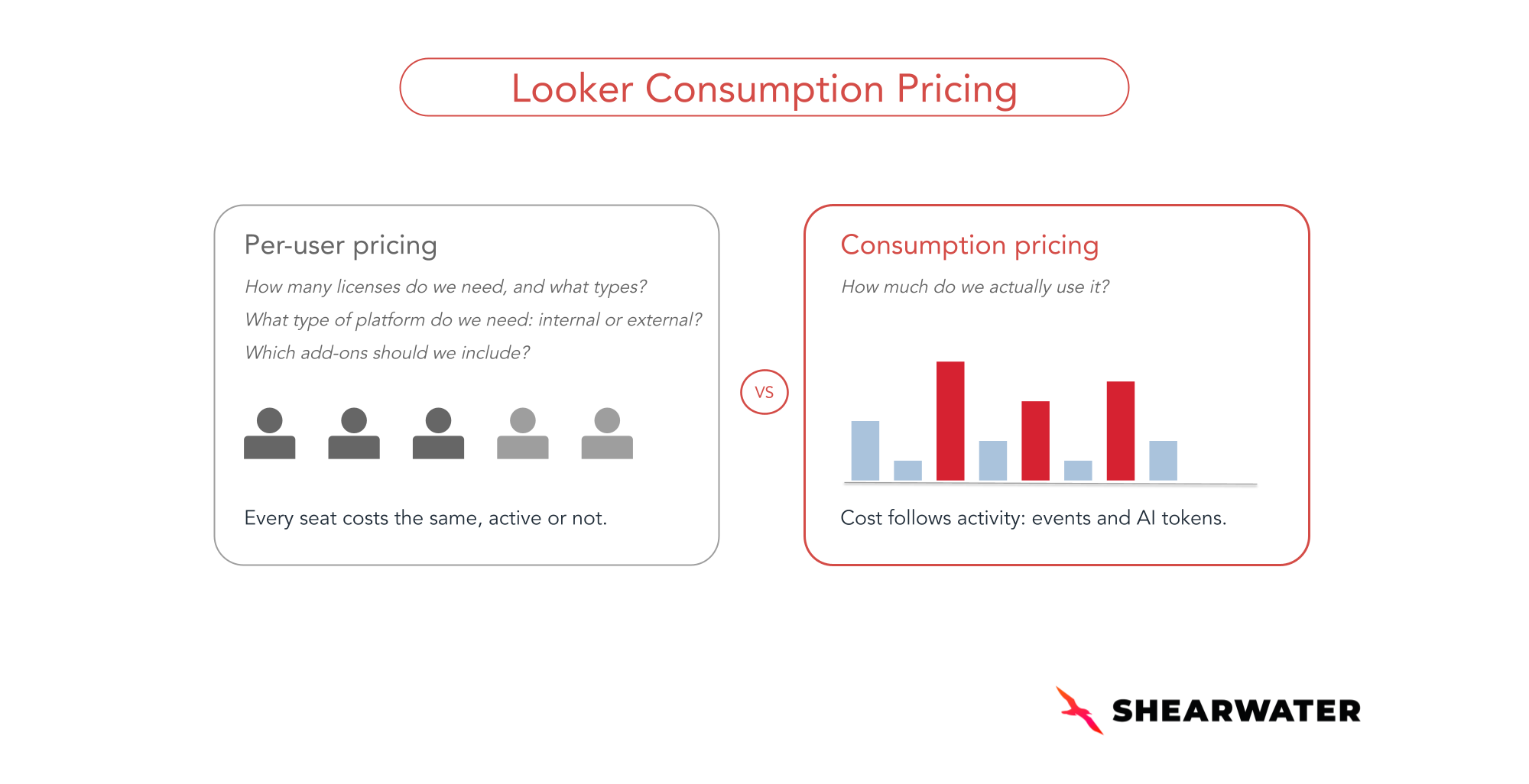
To keep up with the way modern data and AI solutions are built and deployed, Looker introduced a new pricing model: Looker Consumption Pricing, which bills for actual usage instead of the number of users. What you pay now depends on how your company actually uses the Looker platform.
It's worth noting that the per-user model, which we cover in detail in our Looker pricing guide, is still available. The difference is that now you can choose the one that best fits your organization.
As an official Google Cloud partner, we at Shearwater set out to understand how this new pricing model really works, and we're sharing what we've learned here.
In this article, we break down:
- How Looker consumption pricing works
- What Counts as a Looker Event (and what doesn't)
- Looker plans, AI tokens and estimated costs
- How to choose which model makes the most sense for your company
How Looker consumption pricing works (Looker Events Explained)
The new model is based on the consumption of Looker Events: units of work the platform performs to process and deliver data to users, applications, or AI agents.
The principle is that billing should be tied to the actual delivery of business value, not simply to the use of features. That's why billable activities are the ones that invoke Looker's semantic layer to run queries and serve data.
Administrative, configuration, and development activities are not billable, as long as they don't involve operations classified as consumption events.
What Counts as a Looker Event (and What Doesn't)
Activities that count as Looker Events
- Viewing content (dashboards or Looks)
- Running a query
- Running a scheduled task (schedule)
- Rendering a document (PDF or CSV)
- Loading a Looker iFrame
- Fetching data through the Looker API
- Starting a conversation
- Interacting with a Looker Agent
Activities that don't count as Looker Events
- Browsing the Looker instance
- Authenticating a user
- Adding a new user
- Saving content
- Updating roles or permissions
- Validating LookML
- Pushing LookML changes to Git
- Creating folders or boards

In practice, this changes how you budget, how you expand access, and how you think about AI adoption: one more agent conversation now has a cost, while one more casual user may cost almost nothing.
Looker Plans Under the Consumption-Based Pricing Model
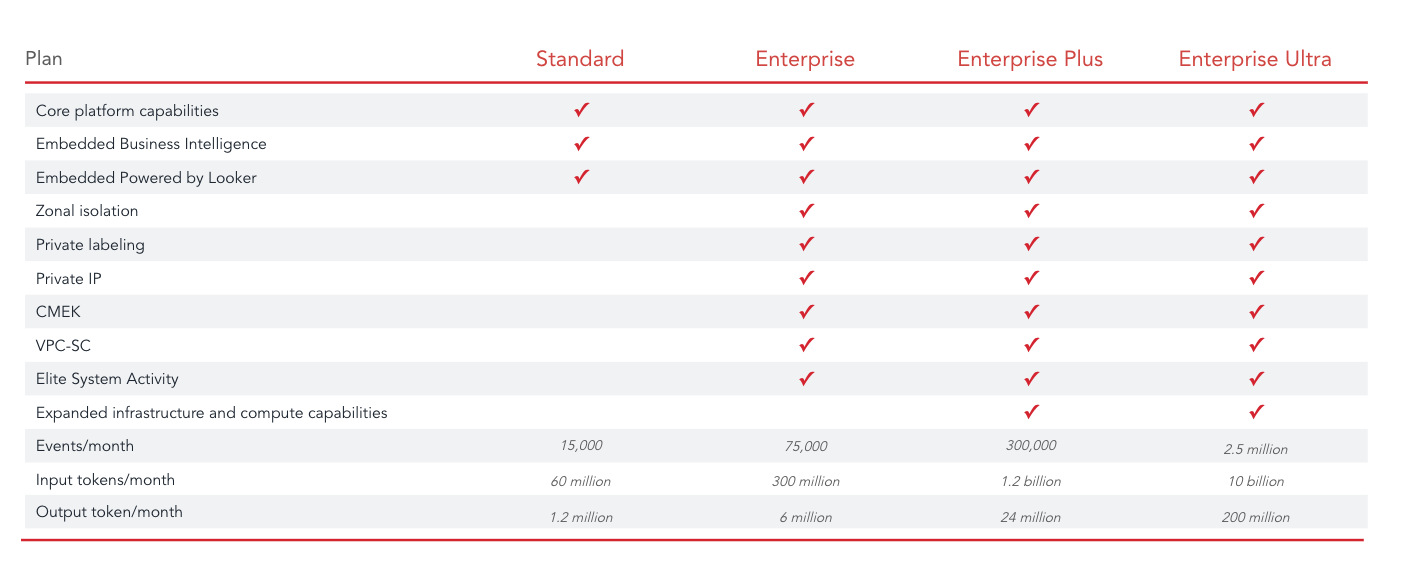
Looker consumption pricing introduces four subscription tiers: Standard, Enterprise, Enterprise Plus, and Enterprise Ultra. Each one bundles event allowances, AI tokens, and compute resources, with different capacities and limits depending on the plan.
What's included in each plan?
Unlike the per-user pricing model, the new consumption-based pricing model includes full BI and Embedded Analytics capabilities across all plans. Non-production instances are available on the Enterprise, Enterprise Plus, and Enterprise Ultra plans at 10% of the list price.
Additionally, all plans come with a monthly allowance of Looker Events and tokens for generative AI features.
Looker cost by plan (estimated)
The table below provides estimated pricing for each plan. However, Google Cloud has not yet published official pricing, so these figures should be considered preliminary. Commercial discounts may also apply, potentially affecting the final subscription cost.

It's worth noting that, regardless of the plan, you can add as many users as needed without directly affecting the subscription price.
Overage and plan changes
If you exceed your included event or AI token allowance, usage can continue uninterrupted, with additional consumption billed accordingly. Higher-tier plans offer larger monthly event allowances and lower per-event overage costs, while AI token overage rates remain the same across all plans.
You can also manage your usage or switch plans directly from the console, without renegotiating your contract or going through a new procurement cycle.
How to Choose Between Looker Consumption Pricing and Per-User Pricing
As we've seen, consumption-based pricing ties cost to activity instead of headcount. In practice, that difference can be significant.
Imagine a company with 50,000 Looker users. Under per-user pricing, Looker would cost at least around $400,000 per year. But roughly 80% of those users log in only once a month.
When you look at actual usage in Looker's System Activity (content views, queries, schedules, API and embed usage, and AI conversations), you find that it fits within an Enterprise Plus plan at $180,000 (estimated).
This is a real Shearwater case. Simply by comparing Looker's two pricing models, we identified annual savings of more than 50%.
The new model can change the math for organizations with broad but shallow usage, and giving the whole company access stops being a licensing debate. But this only works if you know your real usage patterns before you sign, because it can backfire. We've also seen cases where Looker costs far more under consumption-based pricing than under per-user pricing.
With that in mind, before choosing between per-user and consumption based pricing, check:
- How many users access Looker every day, and how many only occasionally?
- What license types do your users have (Developer, Standard, Viewer), and how much do they cost in total?
- How many events do you generate per month, including peak months?
- How much of your usage is automated (schedules, API, embedded)?
- How much AI (conversations and agents) do you use, or plan to use?
- Do you want to run internal BI and embedded analytics on the same instance?
- At what usage level does a plan upgrade beat paying overage?
Choosing the right model takes real math, and estimating your average number of events is harder than it looks. An average hides the peaks, and the peaks are what push you into overage. Schedules and embedded dashboards run even when no one logs in, and AI conversations grow quickly once people start trusting them, to name just a few factors.
Analyzing your usage in System Activity is a good starting point, but on its own it isn't enough for a sound decision. A solid estimate needs the full context of how your company uses Looker: it segments users by behavior, separates human activity from automated activity, and models peak months. Only then can you choose the right model for your organization.
Frequently asked questions
1. How much does Looker cost in 2026?
It depends on the model. Under per-user pricing, cost follows the number of licenses (see our per-user breakdown). Under consumption pricing, it follows the events and AI tokens you use. The figures in this article are estimates; Google Cloud has not published official pricing.
2. What is Looker consumption pricing?
A Looker pricing model that bills for usage (Looker Events and AI tokens) instead of the number of users, across four plans: Standard, Enterprise, Enterprise Plus, and Enterprise Ultra.
3. What is a Looker event?
A unit of work Looker performs to process and deliver data to users, applications, or AI agents, such as viewing a dashboard, running a query or schedule, rendering a PDF/CSV, loading an iFrame, fetching data via the API, or interacting with a Looker Agent.
4. Is per-user pricing going away?
No. Both models remain available side by side.
5. Is consumption pricing cheaper than per-user pricing?
Not always. It tends to favor broad but shallow usage; heavy, automated, or AI-intensive usage can cost more than per-user licensing. Model your real usage, including peak months, before deciding.